Before you start
Before depositing, make sure of three things:
- You have an active Airtel Money wallet with enough balance to cover the deposit and Airtel’s network fee (typically 0.5–1.5% on top of the amount).
- The casino account name matches your Airtel Money registration name. This is the single most common cause of withdrawal blocks later. Fix it now if there is a mismatch — change it on the casino side before you fund.
- You know the casino’s minimum deposit. Most operators we cover accept 500–1,000 UGX. The minimum is shown on the cashier deposit page before you commit.
If you do not yet have a casino account, our editorial ranking lists the six operators currently in our coverage, sorted by cashier clarity.
The two deposit paths
Airtel Money deposits at Uganda casinos follow one of two flows. Which one you see depends on the operator’s gateway integration.
Path 1 — Direct cashier listing (fastest)
This is the cleaner of the two paths. You see “Airtel Money” as a top-level cashier method, with the Airtel logo. Used by 22Bet, MELbet, BetWinner, 1xBet, Premier Bet, and Betway — all six operators we cover.
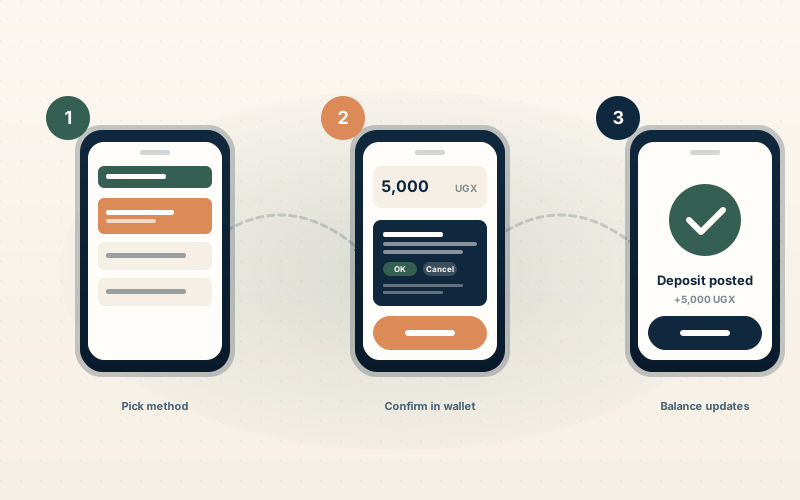
Step by step:
- Log into your casino account on your phone (the same phone that holds your Airtel Money number).
- Open the cashier or “Deposit” menu — usually top right or under “Account”.
- Select “Airtel Money” from the payment-method list.
- Enter the amount in UGX. The cashier shows the minimum and maximum inline.
- Confirm. The casino sends a USSD prompt or app push to your registered Airtel number.
- In the Airtel Money menu, confirm the transaction with your wallet PIN.
- The deposit posts to your casino balance within seconds of the wallet confirmation. Refresh the cashier screen if you do not see the new balance after 30 seconds.
Path 2 — Local payment gateway (slower)
Some operators route Ugandan deposits through a third-party aggregator that consolidates Airtel Money, MTN Mobile Money, and bank transfer into a single “Mobile Money” cashier entry. The flow is similar but adds a redirect step.
Step by step:
- Log into your casino account.
- Open the cashier.
- Select “Mobile Money” or “Local Payments”.
- Pick “Airtel Money” from the gateway’s secondary menu.
- Enter the amount, confirm, and follow the gateway’s instructions — usually identical to the direct path.
- The deposit may take 30–90 seconds longer to post because the gateway batches transactions.
If you see a generic “Mobile Money” entry without a separate Airtel logo, you are on Path 2. It works fine — just allow extra time on the first deposit so you do not refresh the cashier prematurely and trigger a duplicate request.
What to enter, what to check
A few small details that prevent the most common deposit failures:
| Field | Check |
|---|---|
| Amount | At or above the operator’s minimum (usually 500 or 1,000 UGX). At or below the daily maximum. |
| Currency | UGX. The cashier locks this once you pick Airtel Money — verify it has not switched to USD. |
| Phone number | Should default to the number registered to your casino account. If it asks again, enter your registered Airtel Money number, not a friend’s. |
| PIN | Your Airtel Money PIN, not your casino password. They are different. |
Confirming the deposit landed
After you confirm in the Airtel Money menu, three things should happen in this order:
- SMS confirmation from Airtel — within 5 seconds — showing the amount debited and the merchant name.
- The casino balance updates — within 5–30 seconds. Refresh the cashier screen if it does not auto-update.
- A casino email — within 1–5 minutes — confirming the deposit posted.
If the SMS arrives but the casino balance does not update within 90 seconds, do not retry the deposit. Open live chat first — the deposit has almost certainly posted to the operator’s gateway log even if the balance display lags.
Fees to expect
Two fees can apply:
- Airtel Money network fee — typically 0.5–1.5% of the deposit amount, per Airtel’s “send money to business” tariff. This is deducted by Airtel from your wallet, not by the casino.
- Casino-side fee — almost always 0 UGX at the operators we cover. A small number of operators pass on a 1% gateway fee, which is shown on the deposit page before you confirm.
For the current Airtel tariff schedule, see the official Airtel Uganda Money page. Tariffs are updated occasionally; verify before sending.
Common errors and how to fix them
“Insufficient funds”
Check your Airtel Money balance. The deposit amount plus the network fee must fit within your wallet balance. A 5,000 UGX deposit with a 75 UGX fee needs at least 5,075 UGX in the wallet.
“Invalid PIN”
You used your casino password instead of your Airtel Money PIN. They are different. The Airtel PIN is a 4-digit number set when you opened the wallet.
“Transaction timed out”
The most common cause is closing the Airtel Money menu before confirming. Restart the deposit on the casino side and complete the wallet prompt within the timeout window (usually 60 seconds).
“Number not registered”
The phone number you entered on the casino side does not match an active Airtel Money account, or the account is dormant. Check the registered number in your Airtel Money menu (USSD *185# then “My account”).
Deposit shows debited from Airtel but no casino balance update
Almost always a display lag, not a failed deposit. Open live chat and provide the Airtel transaction reference (in the SMS confirmation). Support resolves these in a single session — do not retry the deposit.
Smart first-deposit habits
A few practices that save time later:
- Deposit the smallest amount first to test the cashier. If anything is going to break, you want it to break on a 500 UGX test, not a 50,000 UGX session.
- Complete KYC before you accumulate winnings. It is faster than scrambling at withdrawal time.
- Use the same phone number for casino registration and Airtel Money. No exceptions.
- Keep the Airtel SMS confirmation for at least 7 days. If a deposit dispute opens, the SMS reference is the cleanest proof.
- Check the cashier on the device you actually play on. Desktop preview can hide mobile friction.
What to do next
- Read the Airtel Money payment guide for cashier-by-cashier comparison across all six operators we cover.
- Read the companion withdrawal guide before you accumulate a withdrawable balance — withdrawal blocks are easier to prevent than to fix.
- See the editorial ranking if you have not yet picked an operator.